Share — exports and transfer
The Share tab is how a roadmap leaves Roadmap Flow — as a stakeholder-ready file, as a package for another Roadmap Flow user, or as a backup.
What it does
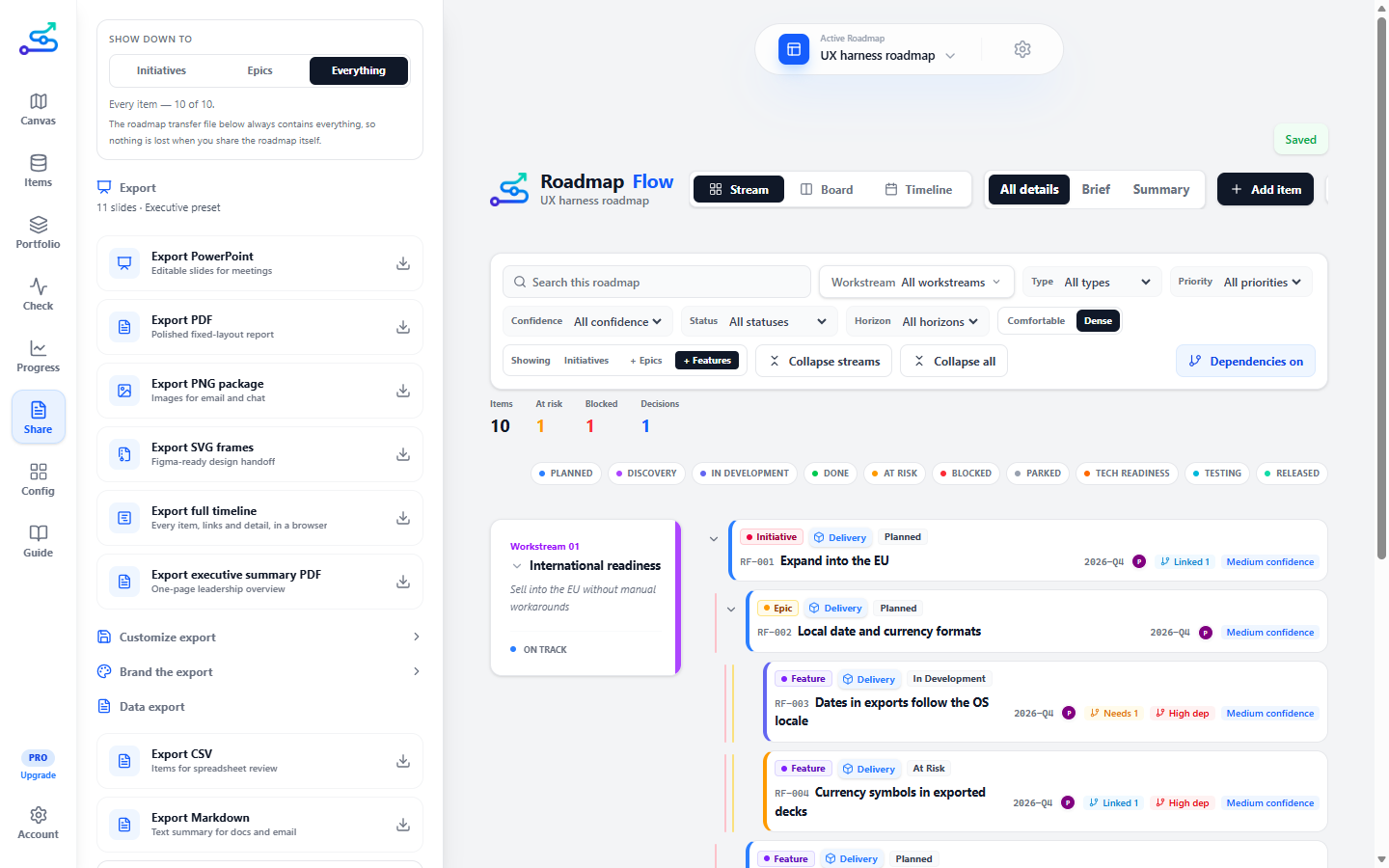
Share is one column of cards, read top to bottom: What goes in, the export formats, Slides in the deck, Look of the export, and Data and the roadmap file. Every card works the same way — icons first, tiles you click — and it offers eleven formats.
What goes in
One panel at the top of the tab decides what every export carries — PowerPoint, PDF, pictures, Figma frames, the full timeline and the one-page summary — so a file always matches what you chose. It is saved with the roadmap.
All streams, or one or a few. An item in two streams goes in with either.
Initiatives, epics and features, each in or out, in their level colours. One always stays in.
Icons for status, owner, priority, dates, horizon, Jira/ADO links, dependencies, build order, item IDs and descriptions. Hover an icon for its name.
The preview is built from the same card data the files are, so what it shows is what you get. On a roadmap that uses levels, every export now reads like the canvas: each card's edge is its level colour (epics orange, features purple, initiatives green, or your own from Config → Level colours), the level is named with the status after it as a coloured dot, and every feature names its epic. On stream slides, features sit directly under their epic; the appendix table gains an Epic column. Choosing one workstream also keeps the dependency slides to dependencies that touch it.
Stakeholder exports — generated from a clean presentation model, not screenshots. Each is a tile under the panel:
An editable meeting deck.
A fixed report.
Use PDF when people should read, not redesign.
A single-page leadership summary.
Pro.
Page images for chat and email.
Figma-ready fixed frames for design collaboration.
Every dated item as one browser page.
See below.
The full timeline
Export full timeline produces a single HTML file. One file, nothing fetched when it opens — it works from an email attachment or a laptop with no connection — and unlike the deck it leaves nothing out to make things fit. Every dated item is on it, links are real links, and each item opens to show its full description — unless you choose to leave some of that out (see Choosing what it carries, below).
Each item is a bar that runs from its start to its end, so a piece of work planned across two quarters stretches across both. Work that overlaps in time goes on separate lines; work that follows on shares one.
Choosing what it carries
The timeline follows What goes in like every other export — this is the one most likely to leave the room, to leadership or to someone outside the company, so it is worth a look before pressing it. What the canvas happens to be showing does not change it; the canvas search and filters do. An initiative with no dates of its own is drawn across the dates of what sits under it when those are left out. Links are worth switching off for a reader outside the company, where they will not open anyway. Switching dates off removes the written period; the bars still sit on their dates.
Each bar's edge carries its level in the roadmap's level colours, as the cards do in the app, with the level named beside its status.
Anything switched off is left out of the file, not hidden, so nobody who receives it can switch it back on — and the page says so at the top: Shared without descriptions and links. Your choices are saved with the roadmap, so a roadmap you share with leadership stays set up for leadership.
Build order travels with every export. An item with an implementation order carries its #3 wherever it is named — deck cards, both timeline sections, this page, the appendix table and Markdown — and numbered items come first, as they do on the canvas. On a timeline, dates still decide where a bar sits; the number only decides which of two bars on the same dates goes on top. CSV keeps the name as it is and puts the number in a Build order column of its own, so a spreadsheet can sort by it.
It is a wide page, so it has controls for staying oriented in one:
The workstream name stays put as you scroll down AND across.
Show one workstream at a time. Appears when there is more than one.
Folds each feature into its epic, which lists them by name and date. Appears only where the roadmap uses epics and features.
Reads a roadmap planned in months as quarters instead. Appears only when it would change something.
Opens or closes every item's description and every workstream at once.
A red line marks today, and the column heading it falls in carries the date — Today · 22 Sep 2026 — so a reader can see at a glance what is behind and what is ahead. The line sits partway across its column rather than at the edge of it: a quarter is three months wide on the page, and a line at its left edge would say today is the first of July when it is the twenty-second of September. A roadmap that does not reach today has no line at all, rather than one drawn at its edge.
A feature whose epic is not on the timeline — undated, or in another workstream — is never folded away, because there would be nowhere for it to go and it would simply disappear. Printing always gives you the complete version, folded or not, because paper cannot be switched back.
Slides in the deck
Which pages a PowerPoint or PDF has. A preset is a chip — Executive, Engineering, Sales, Internal, and any you saved, marked with a star — and each section is an icon tile: Cover, Summary, Status, Timeline, Timeline detail, Streams, Risks, Decisions, Appendix. Clicking a tile changes the next export at once; a small dot on the preset says you have changed it since you picked it, and Save preset keeps the new set under a name. Choosing your own sections is Pro; on Free the built-in presets decide. See Export presets.
Look of the export
The brand kit (Pro): a small strip at the top shows your brand as a slide will — the three colour bands, your logo, company name, footer and confidentiality label — and redraws as you change anything. Below it are three round colour swatches, a tile each for the square and the wide logo, and three short fields. The preset decides what a deck contains; this decides what it looks like. See Brand kit.
Data and the roadmap file
CSV. Use it when someone says, "Can I just see the data?"
Markdown, for docs and email. Preview the Markdown shows it first.
The same Markdown, to the clipboard.
One roadmap, to move into another Roadmap Flow workspace.
A complete copy of the whole workspace, for recovery.
When to use it
- When you need a file for a meeting, a report, or a doc.
- When you are handing a roadmap to another Roadmap Flow user (roadmap package).
- When you want a complete safety copy (workspace backup).
When not to use it
- To change only what is on screen — that is the canvas, not Share.
- To "save" your work. Roadmap Flow saves automatically; exports are copies, not the source of truth.
3-minute flow
- Open the Share tab.
- In What goes in, pick the workstreams, levels and details. In Slides in the deck, pick a preset or click the sections you want. Set Look of the export if you want your own logos and colours on it.
- Choose a format that matches the audience — see the format notes above.
- Export. On the desktop the file lands in your workspace
exportsfolder with a Show in folder action. - For transfer, use Roadmap file; for safety, use Backup.
Best use cases
- A PowerPoint deck for a roadmap review.
- A one-page PDF for a leadership skim.
- A roadmap package to move one roadmap to a colleague.
- A workspace backup before a big change.
Common mistakes
- Confusing the two JSON files: the roadmap package is one roadmap; the workspace backup is everything. They are not interchangeable.
- Exporting with filters still applied and shipping a roadmap missing items.
- Sending a PowerPoint when a PDF was the point — an editable deck invites edits.
Related guide pages
Availability
Free. PowerPoint, PDF, PNG, SVG, Markdown, CSV, the roadmap package, and the workspace backup are free. The one-page executive PDF and branded exports are Pro.