Unsorted feedback
Requests arrive all week — a comment in a channel, a line in a meeting, a customer email forwarded twice. Each one might be a feature, might be an epic, might be nothing. Putting them on the roadmap to avoid losing them makes the roadmap wrong; leaving them in your inbox makes them disappear.
Unsorted feedback is the third option: a place inside your workspace that is explicitly not the roadmap.
What it does
Any status can be marked not on the roadmap yet. Items at that status stay in your workspace and stay searchable, but they stop behaving like roadmap items.
| A roadmap item | An unsorted item | |
|---|---|---|
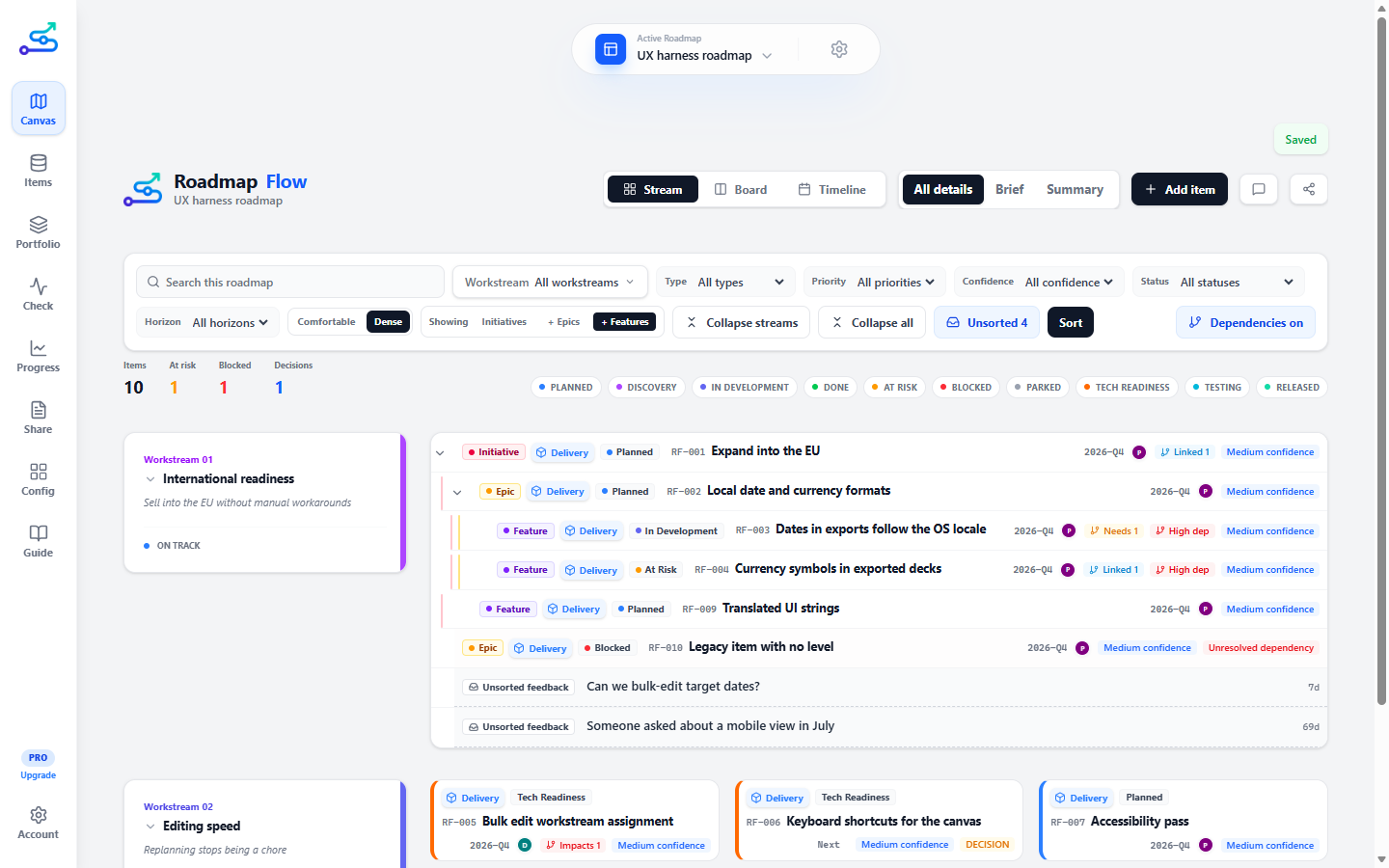
| Drawn on the canvas | Always | Only when you press Unsorted |
| Counted in the item totals | Yes | No |
| Scored by Check | Yes | No |
| Raises Check issues for missing owners, dates, outcomes | Yes | No |
| Included in a stakeholder export | Yes | Never |
| Findable from the Items tab | Yes | Yes |
The one thing Check does say is how big the pile is and how old it has got. That note costs you no points — an unsorted inbox does not make a roadmap unsound, it makes you behind — and it disappears entirely when nothing is waiting.
What it looks like
An unsorted item is drawn as a roadmap item that has not been filled in yet, because that is what it is. No status stripe down the edge, a dashed outline, a plain grey surface, and none of the badges whose answers you do not have — level, type, priority, owner, target period. What is left is the text of the signal, how long it has been sitting there, and one chip:
Captured, not yet decided on. The name is yours — this is whatever you called the status.
The missing badges are the point. When you sort the item, filling them in is most of the work.
When to use it
- Signals from the market that you have not made a decision about.
- Requests that arrive between planning cycles, when adding them to the roadmap would be a promise you have not made.
- Anything you want out of your head and out of your exports at the same time.
When not to use it
- As a backlog. This is not a place to keep work — it is a place to hold things on the way to a decision. If the count never comes back down to zero, it has become the thing it was built to prevent.
- For work you have already committed to. That is a roadmap item with a Planned status, not a signal.
- To hide a roadmap item you would rather not discuss. Use Parked, which is an honest statement that something is deliberately paused.
3-minute flow
Open Config
Go to the Statuses section.
Add a status
Call it Unsorted feedback, or whatever your team already says.
Mark it
Press the inbox button on its row. A line appears under it confirming those items stay out of the health score, the exports and the canvas.
Use it
Give that status to anything you capture. It leaves the canvas immediately.
Look when you choose to
Press Unsorted in the filter row to see the pile, and press it again to put it away.
Sorting the pile
Sort, next to the Unsorted count, opens one signal at a time beside the roadmap. Four ways out, and three of them empty the pile:
It becomes a roadmap item. You answer status, level, workstream and horizon; none of them is guessed for you.
You already have this. The signal joins an existing item as evidence, rather than becoming a second copy of the same request.
The answer is no. It asks for a reason and will not take an empty one, and the signal is kept rather than deleted.
You genuinely cannot decide yet. It stays in the pile and keeps ageing.
"Already on the roadmap?"
Before you choose, triage shows the items that share wording with the signal, and the words they share, so you can check the match rather than take its word for it. Click one to merge straight into it; it lights up on the canvas so you can see what you would be attaching to.
This is word matching, not a clever guess. Something asking for the same thing in different words will not appear — "bulk edit target dates" and "change several items at once" mean the same and share nothing. So an empty list means "nothing matched", never "this is new", and the page says so rather than letting you read it the other way.
Promotion is where "is this a feature or an epic?" gets answered — once, at the moment you commit to it, and never while it is still feedback. An item with no level is treated as an epic, so skipping the question would answer it for you, usually wrongly for something that arrived as one sentence.
What you sorted keeps its words. Promoting or merging a signal records what it said on the item it became or joined, with the date it was captured. You can read it on the item under Handover readiness, and it travels into the handover brief quoted rather than retyped — which is the one thing about a piece of work that nothing downstream preserves.
Merging is why finding duplicates is worth the minute it takes. Two people asking for the same thing is not two items; it is one item with two pieces of evidence, and that count is a better argument in a roadmap review than a priority you assigned yourself.
What we decided not to do
Declining keeps the request and your reason rather than deleting them, and the Declined tab in triage is where they live: newest first, read-only, with one action — Reopen, which puts it back in the pile.
That list is the answer to the conversation everybody has eventually. Somebody asks for the same thing three months later, or asks why it never happened, and without a record the honest answer is "I think we talked about it". Every roadmap tool records what you chose; almost none records what you turned down.
Triage also checks it for you: if a new signal shares wording with something you already declined, it says so — with the reason and the date — before you spend the decision again.
Saving the register as a page to send someone is Pro. Keeping the record is free; the artefact you hand to another person is the paid part, the same line the handover brief sits on.
Best use cases
- A weekly sweep, where everything collected lands in one place and gets sorted in one sitting.
- Keeping a roadmap presentable while a noisy quarter is going on around it.
- Recording that a request arrived, even when the answer turns out to be no.
Common mistakes
- Letting the count climb. Past twenty it turns amber, and Check starts saying how long the oldest one has waited. Both are there to be acted on.
- Marking a status you already use. Every item at that status leaves the roadmap at once. Make a new status instead.
- Expecting exports to include it. They never will, on purpose. If a signal belongs in a stakeholder conversation, make it a roadmap item first.
Related guide pages
- Statuses, priority, and confidence
- Sort your unsorted feedback
- The handover brief
- Check — roadmap health
- Config
Availability
Free, on every plan. Saving the declined register as a page to send someone is Pro — the record itself is free.