Check — roadmap health
The Check tab grades your roadmap and lists exactly what is wrong with it, before a stakeholder does it for you.
What it does
Check produces a health score from 0 to 100 — Healthy at 80 and above (green), Needs attention from 50 (amber), Needs work below (red). The score drops for critical issues and for warnings; how many of each there are is counted right under it.
Below the score, Check lists issues in categories you can filter:
At-risk work, low-confidence P0s, and items marked high risk.
Blocked items and the reasons behind them.
Items with no owner team.
Missing time horizon, missing target period, and overdue target periods on unfinished work.
Items flagged as needing a decision.
Dependency problems.
Items at the tech-readiness gate that are missing what a delivery team would need — description, owner, outcome, scope, measure or target.
An item sitting somewhere its level cannot legally sit. See Initiatives, epics, and features.
A time horizon that contradicts a parent, a dependency, or the item's own status. Usually arrives from moving a card on the Board.
How much unsorted feedback is waiting, and how long the oldest has waited. See Unsorted feedback.
Every category except Intake costs you points. Intake is a note, not a defect: an unsorted inbox does not make a roadmap unsound, so the score ignores it. It disappears when nothing is waiting.
Every actionable issue has a button that jumps straight to the item that caused it — and puts the cursor in the field to change — so fixing the roadmap is a loop, not a scavenger hunt. When one item has three or more issues of the same kind, they share one card — "RF-006" has 7 handover issues to fix — with a button for each.
One list, everywhere. Check, the cards and the item panel all read the same list of problems, in the same words:
- On the card (in All details), a mark such as ⚠ 2 to fix; hover it to read what they are.
- In the item, however you opened it, a Needs attention list at the top says each problem, outlines the field to change and scrolls to it, and offers a one-press fix where the answer is clear — Move this to Next, The decision is made, Risk is now medium — or a link to the other item when the fix is there.
- After each change the list is worked out again. A problem that has gone is reported in green — Fixed — and the card and the Check score change with it. If your change caused a new problem, it appears straight away, often under Involves this item when it sits on a neighbour.
Fixing a whole group at once
Above the list, Fix together appears when several items share a gap that one setting closes:
→ Owner
→ Horizon
→ Target
→ Target
Pressing one opens the Items list with those items already ticked and the bulk bar showing, so fourteen missing owners is one action rather than fourteen.
Nothing else is offered here, deliberately. A blocked item, a P0 at low confidence, a description that is missing — each needs a decision of its own, and a "fix all fourteen" button would be promising something the bulk bar cannot deliver. A group has to hold at least two items to appear; for one, the issue's own Fix button is the shorter route.
The chips follow the category filter. Filter to Planning and Fix together describes the Planning issues only.
When to use it
- Before any roadmap review — run Check and clear what you can.
- After a big round of edits, to catch what you left half-done.
- When a roadmap "feels off" but you cannot say why.
When not to use it
- While the roadmap is still a rough draft. A half-built roadmap always scores low; that is not useful information yet.
- As a target in itself. A perfect score on a roadmap nobody believes is worth nothing. Check supports judgement; it does not replace it.
3-minute flow
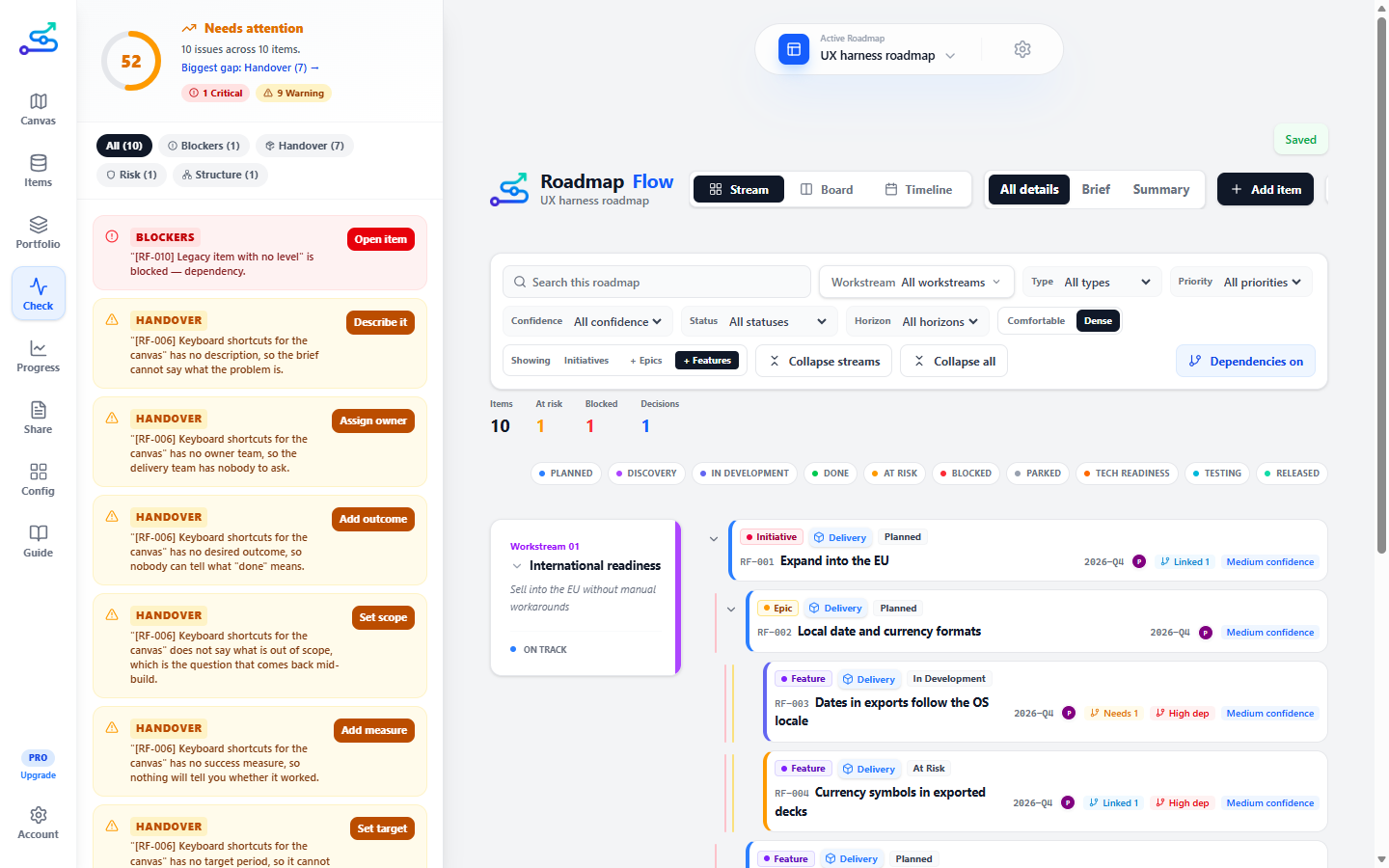
Read the score
Open the Check tab.
Start with critical issues
They cost the most points and usually matter most.
Work one category at a time
Use the category chips.
Fix a whole group
Use Fix together where several items share one missing setting.
Fix the rest on the item
Click an issue's action button, then return.
Watch the score move
It updates as you go.
Best use cases
- A pre-review quality pass.
- Catching missing owners and overdue target periods.
- Surfacing low-confidence P0s so the review can discuss them on purpose.
Common mistakes
- Chasing the number instead of fixing the substance.
- Ignoring warnings because they are not critical — several warnings usually point at a real gap.
Cleaning up orphan dependencies
If you delete a roadmap item that other items depended on, the Check tab flags the dependency as broken. The issue card shows the dependency's reference, the source item's RF-ID, and the direction of the broken link. Click Remove orphan dependency to clean it up — the validation issue clears immediately and the cleanup persists after reload.
Related guide pages
Availability
Free. Available on every plan.