Canvas
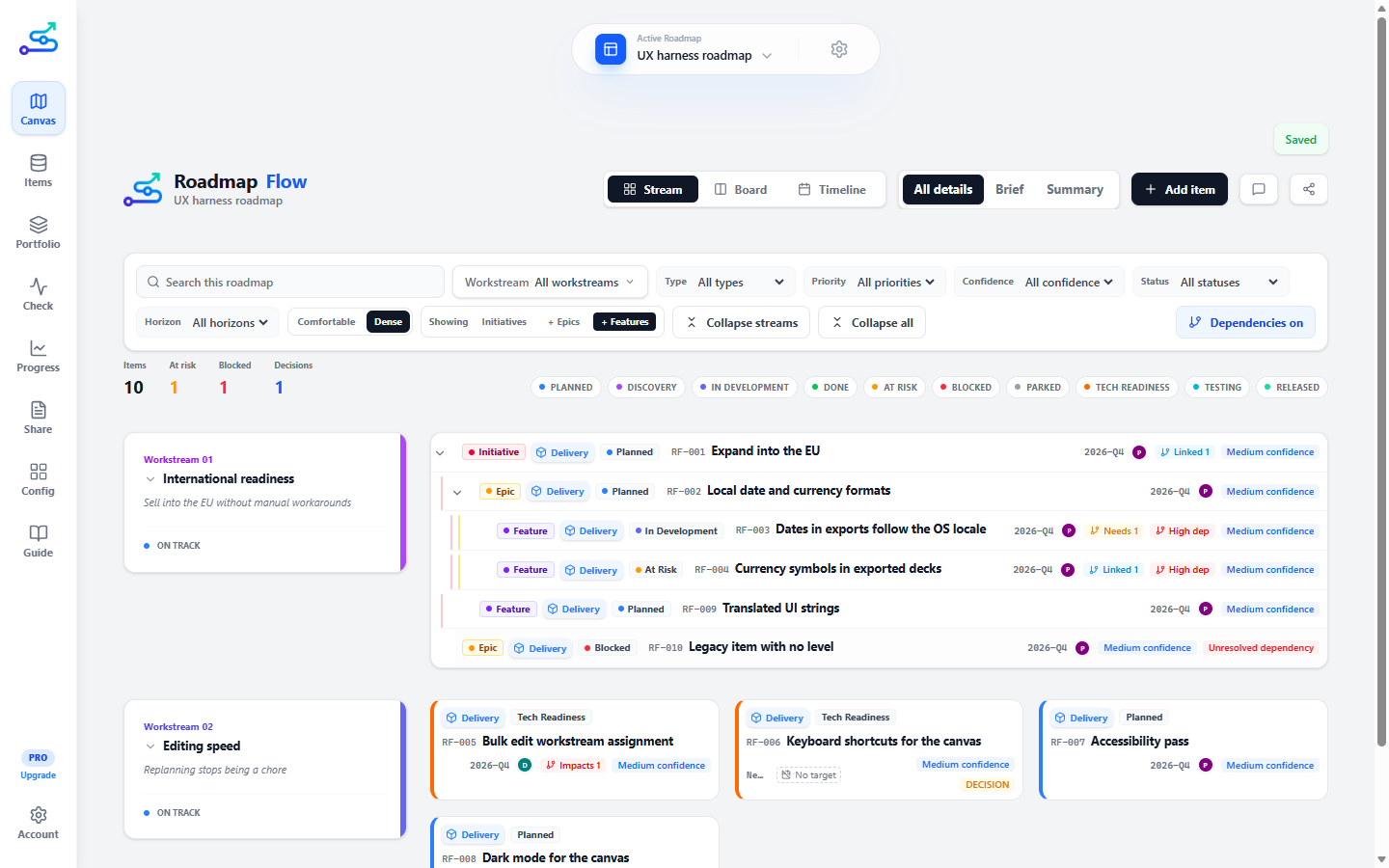
The canvas is the heart of Roadmap Flow. It is the roadmap itself, drawn the way an audience will see it, and it stays visible no matter which tab you are in.
What it does
The canvas renders your roadmap in three layouts, switched from the canvas header:
One row per workstream, items as cards.
Best for showing how work splits across areas of the product.
Columns by time horizon — Now, Next, Later, Not Doing.
Best for showing what is committed and what is not.
Lanes by workstream across a calendar, in Weeks, Months or Quarters.
Best for showing when.
A detail switcher (All details / Brief / Summary) controls how much each card shows, so the same roadmap can be dense for working or clean for presenting.
The bar above the roadmap keeps to one or two lines, so the roadmap starts near the top of the screen:
Type, priority, confidence, status and horizon. The button says how many are on — Filters · 2 — and Clear filters appears beside it.
Search, Workstream, Showing and Rank by stay out on the bar.
Comfortable / Dense (how much room each card takes; Dense is the default), Collapse streams, Collapse all, and the dependency lines.
How the canvas is drawn, not what is on it.
The status chips under the bar narrow what is shown too, without changing the roadmap itself.
Each roadmap can carry its own image, shown beside its name in the roadmap selector: the gear beside the name → Roadmap image → Upload image. It is cropped to a small square and saved with the roadmap, so colleagues opening a shared workspace see it too. Without one, the selector shows your Brand kit's square logo, or the default mark.
A new roadmap with nothing on it shows none of this. It opens on Start your roadmap: add the first item, import what you already have from a spreadsheet, Jira or Azure DevOps, or give the roadmap its name.
When there is too much on screen
A roadmap of a few hundred items does not fit on a screen, and searching for something you can see is a poor substitute for being able to see it. Three controls reduce what is drawn, and none of them changes the roadmap:
Folds every workstream down to its heading, each saying how many items it is holding. In View, on any roadmap, in Stream view.
Click a single workstream heading to fold just that one.
Draws the roadmap only down to a chosen level — Initiatives, + Epics, or + Features. Appears once a roadmap uses levels.
The fastest way to get a whole roadmap onto one screen.
Folds every parent item into itself, leaving initiatives and anything with nothing above it. In View once a roadmap uses levels, in Stream view.
Collapse streams and Collapse all fold different things — the rows and the items inside them — which is why they are two buttons rather than one clever one.
While you scroll a long workstream, its heading stays pinned beside its own items and lets go when the next workstream arrives, so "which stream am I looking at" never needs scrolling back up to answer.
Which card comes first
Rank by decides the order of cards in all three views at once — down a Board column, along a Stream row, and from the top of a Timeline lane. It never moves a card to another column or off its own dates; it only decides who goes first.
Initiatives first, then epics, then features. The default.
The read that matches how the roadmap is built.
Numbered cards first, lowest number first; the rest after them.
When the question is "what do we start on".
Earliest start first.
When the question is "what is coming up".
Earliest target first.
When the question is "what is due".
Whichever you pick, an item with no target date goes below every item that has one — whether it has only a start date or no dates at all. The choice then orders the two groups separately. An initiative or epic with no dates of its own counts as dated when the items under it are — it ranks by the span they give it — and only one with nothing dated anywhere below it goes last. Within the same level, Hierarchy keeps numbered cards ahead of the rest. In Stream, an item nested under a parent stays under it whatever you pick; the choice orders the rows at each step of the tree.
What moved since last week
Changed rings the items that changed in a time window — Session, Today, This week, This month, or All — straight on the canvas, so "what moved since last week" does not mean reading the Progress log and then going to find each item by hand.
It marks; it never hides. Every item stays on the canvas and the ones that changed gain a ring, because the question is "which of these moved", not "show me only the ones that did". The windows are the same windows the Progress tab uses, so the two always agree.
The control appears only once a roadmap has some history, and it shows what you asked for rather than following your edits: change something while it is on and the new item is not ringed until you pick a window again.
Finding one item
Ctrl K (Cmd K on a Mac) puts the cursor in the search box from anywhere. Type to search the whole roadmap — titles, descriptions, notes, workstream and owner names — or type a reference like RF-042 to go straight to one item. Matches appear in a list under the box, wide enough to read each full name. The canvas stays where it is while you type; it moves only when you pick a result — arrow keys and Enter, or a click — and then it goes to that card and opens it.
Search is not a filter. It looks at every item, including the ones your current filters are hiding, and marks those with an eye icon rather than pretending they do not exist.
With the box focused and nothing typed, it lists the last few items you opened, so getting back to the one you were just in does not need a search at all. That list is per session — close the app and it starts empty again.
Items are rows when there is room
On a wide screen a Stream item lays itself out as a single line — level, type, status, reference and title, with its period, owner and confidence on the right — and a nested workstream reads as one list with a thin line between rows. Make the window narrower and each item folds back into a card, because three lines of content need the room. Items inside Timeline and Board columns are always cards: a column is too narrow for a row.
Moving work on the Board
Drag a card into another column to change that item's time horizon — Now, Next, Later or Not Doing — without opening it. The whole card is the handle, so there is nothing to aim at. A card with no horizon yet sits in Unset, which appears only when something is in it.
Without a mouse: Tab to the card, then hold Alt and press ← or →. It moves one column each press. There is no mode to enter or leave — the card moves straight away, and the line that appears has Undo in it if you overshot.
A time horizon is a claim about order, and the Board cannot see what that claim might contradict. So while you are moving a card, every column says what dropping there would do:
A feature in Now while the epic it belongs to is in Later.
Planning work under something already decided against.
Scheduled before the thing it depends on.
Depends on work that is in Not Doing.
Moved to Not Doing while its status says work is happening.
Moved to Not Doing after it was done.
After the move, a line names the problem with Undo beside it.
It stays visible until it is sorted, however it happened — a drag, an edit in the item panel, an import. The card that is out of step gets a solid outline and an Out of step label; the work it doesn’t line up with gets a dashed outline and an Involved label, so you can see both halves and which one to move. Hover either label to see what’s off. Each column shows how many of its cards are in conflict, and a line above the Board gives the total. None of this can be dismissed, because it is not about something that happened — it is about the roadmap as it is — and it disappears the moment the roadmap stops contradicting itself.
Keeping a move you were warned about is a real choice, not a shrug: the same conflict appears in Check under Sequencing and counts against the score until you resolve it.
An item with no horizon is not making a claim about order, so nothing is flagged while it sits in Unset. A custom status is never judged either — nothing can know what your own status names imply about whether work is happening.
Getting around the Timeline
The Timeline scrolls in two directions, so it has controls the other layouts do not need:
- The period header stays pinned to the top and the workstream names to the left, so neither kind of scrolling loses your bearings.
- Weeks / Months / Quarters each show how many columns they would produce before you pick one. − and + make columns narrower or wider, and Fit sizes the whole roadmap to the window. Whatever you were looking at stays on screen: scrolled to July in Months, you land on Q3 in Quarters.
- Today is marked with a red line, and the Today button brings it back into view when you have scrolled away.
- Full screen gives the Timeline and its controls the whole window.
- If you scroll into a stretch with nothing in it, the Timeline says how many items lie either side and offers to take you to the nearest.
The toolbar also counts what has no target date, and that count is a button: pressing it opens the Items list narrowed to every undated item on the roadmap, where you can select them and set a target for all of them at once. See Items.
An item with no start or target period cannot be placed on a calendar and does not appear here — it is still on Stream and Board. One with a start but no target is drawn, as a bar with no end, which is why the count is about targets rather than about what is missing from the picture. If an initiative has no dates of its own but the items under it do, choosing Showing: Initiatives spans it across the period those items occupy and marks the span with a ~, so you can see it was worked out rather than chosen by you.
When to use it
- Whenever you are shaping, reading, or presenting the roadmap.
- When you want to see structure — how items group, sequence, and relate.
- Live in a review: switch layout and detail level as the conversation moves.
When not to use it
- When you need to find one specific item fast, or work down a long list — the Items tab is quicker for that.
- When you want to check roadmap quality — that is the Check tab.
3-minute flow
- Open the app; the canvas is already there.
- Use the header to switch between Stream, Board, and Timeline.
- Set the detail level to match your audience.
- Click any card to open its detail panel; the canvas stays visible.
- Use search, Filters or the status chips to focus on a slice.
Best use cases
- Presenting the roadmap in a review.
- Sanity-checking structure after a round of edits.
- Reframing the same roadmap — by area, by state, by time — in one conversation.
Common mistakes
- Presenting in All details to an executive audience. Use Summary.
- Forgetting that active filters carry into exports. Clear filters you did not mean to apply.
- Reading Timeline Months mode as a delivery schedule. It only reflects the periods you set on items.
- Assuming the Timeline is empty when it is only scrolled somewhere empty. Use Fit, or Today, to get back to where the roadmap actually is.
Related guide pages
Availability
Free. Available on every plan.